With a Solis battery or hybrid inverter we can set it to charge up the house batteries on a cheap power tariff, usually overnight, and then use that cheap electricity to power the house during the day.
Setting TOU Charging on SolisCloud
1. While logged into the Solis online interface, SolisCloud.com, on the Overview page select the Device tab on the left hand side:
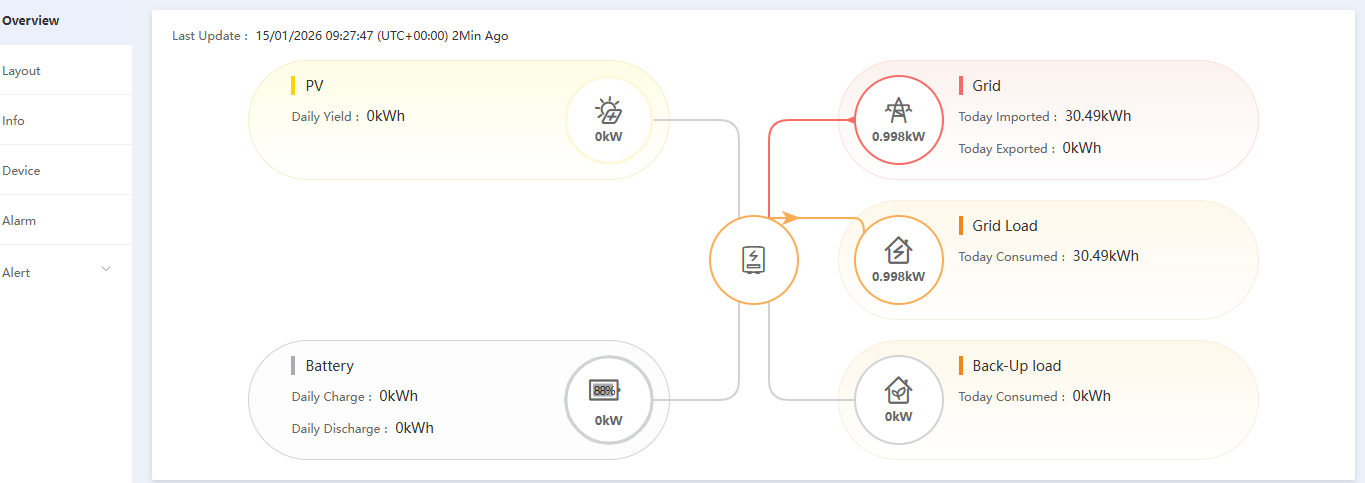
SolisCloud.com interface (Image: Tanjent)
2. There in the Device view under Inverter SN select the inverter’s serial number which is highlighted in blue and is actually a link to the Inverter page.
3. On the Inverter page select the Inverter Control button top right (if that brings up a Disclaimer press Agree and Continue):
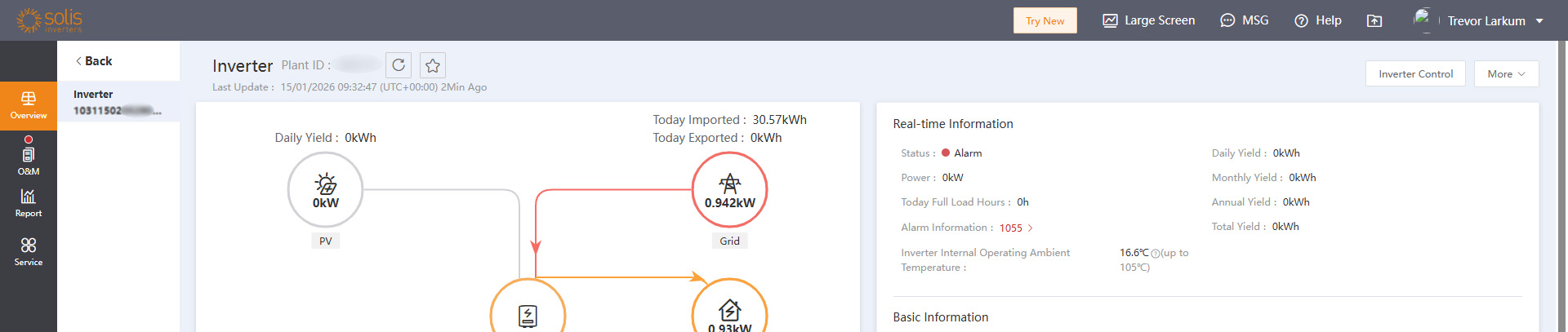
Inverter Control page on SolisCloud (Image: Tanjent)
4. On the next dialog box enter your password (the same one you use to login to SolisCloud) and press OK.
5. This goes to the Inverter Control page where there are many advanced settings – obviously only change those that you understand as it is possible to make changes here that stop the inverter from functioning. Here we are looking for the Charge&Discharge Slot settings. Note on different systems it has been under Work Mode->Self-Use Mode. On this inverter it’s under Storage Mode:
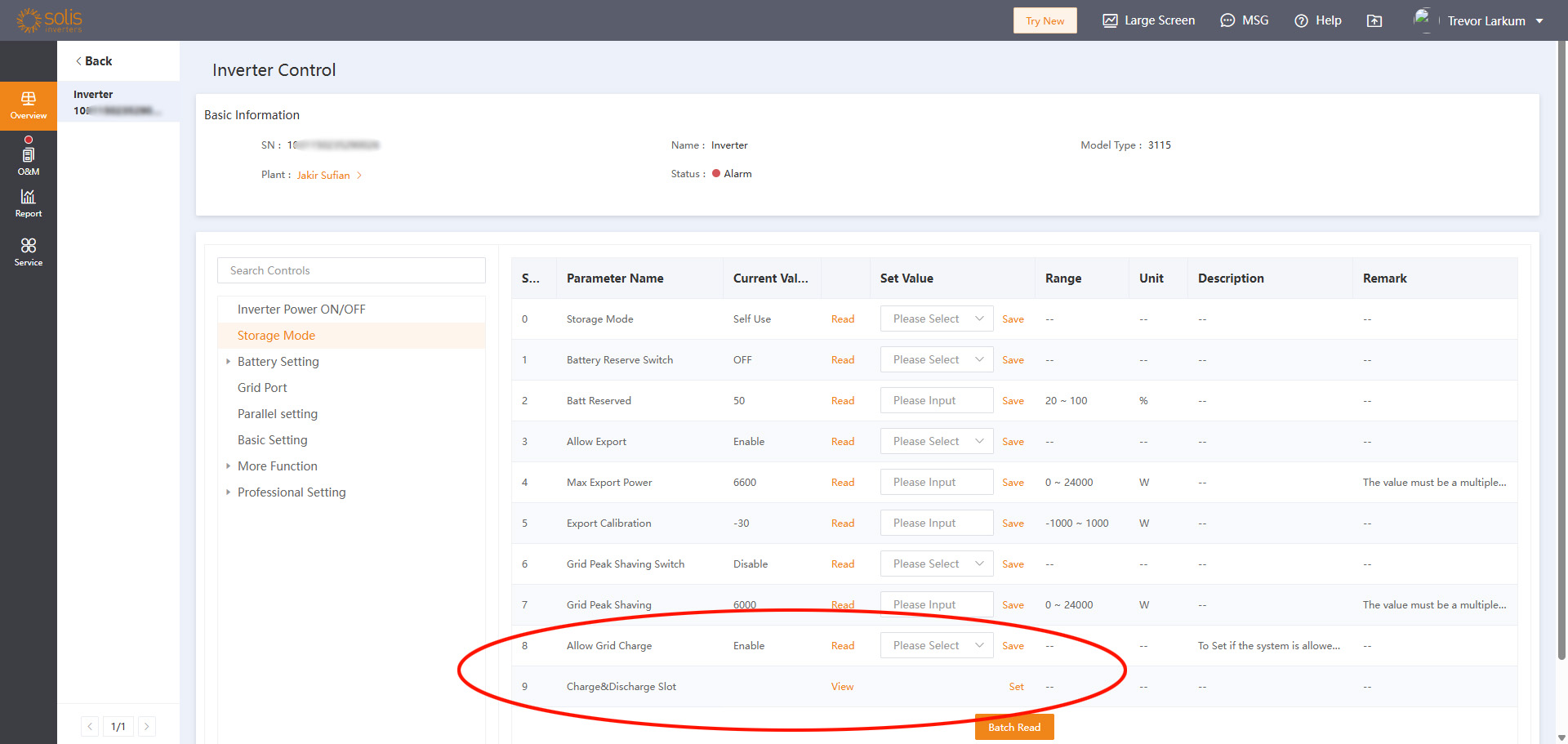
Inverter Control charge settings (Image: Tanjent)
6. If there’s a Time of Use Switch or an Allow Grid Charge setting then it should be enabled. Naming of settings seems to vary between inverter models and firmware versions. If the main Charge&Discharge Slot setting is not available then the inverter likely needs a firmware upgrade (contact Solis Support).
7. To see the current charging values select Charge&Discharge Slot -> View. To change them select Charge&Discharge Slot -> Set which brings up the following dialog:
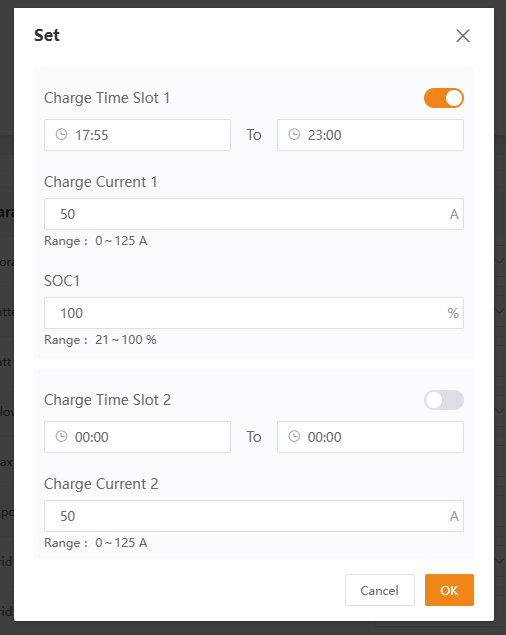
Charge and Discharge Slot settings (Image: Tanjent)
8. Enter the settings you want. If you want a simple overnight charge then you would just fill in Charge Time Slot 1, but there are more charging slots if you need them. If you have a tariff that pays you to export in a particular time window then you might also set a Discharge Time Slot (scroll further down the same dialog). See notes below on Charge Current and SOC. The main ‘gotcha’ to note here is that the Enable sliding button top right must be set for each slot we want to operate, otherwise the slot settings are just ignored.
9. Press OK on the dialog. There should be a Command Successful message, then just select OK. The system is now set to charge up in the enabled slots.
Things to Note
Remembering that most batteries are fully charged at about 50V and power is voltage x current we can calculate the Charge Current we want, for example 50A x 50V would give 2.5kW so that would charge 10kWh of batteries in 4 hours, for example. We may choose to charge at the lowest current (and therefore lowest heat produced and lost) that will charge our batteries in our overnight cheap tariff window.
SOC is simply State of Charge, i.e. how full we want the battery to get, as a percentage, assuming we have set a higher enough charge current to reach it. If we set 100% but it only reaches 80% in the specified time then we may need to increase the Charge Current. However it may not be achievable if the inverter is not powerful enough, i.e. we have a large amount of batteries relative to the size of inverter.